
Witcher 3 Next-Gen PC Performance Guide: Best Settings, DX11 vs DX12, Ray Tracing, DLSS & FSR
Witcher 3 next-gen PC performance guide: official specs, DX11 vs DX12, ray tracing costs, DLSS 3, FSR 2.1, XeSS, CPU fixes and presets by GPU tier.

In this article (0 sections)
Updated September 27, 2026. The best way to run The Witcher 3 next-gen (version 4.x) on PC depends on one choice before anything else: DirectX 11 or DirectX 12. DX12 unlocks ray tracing, DLSS, DLSS 3 Frame Generation and the ULTRA+ preset, but it is the heavier, more CPU-sensitive mode. This guide covers the current PC version, official requirements, the settings that cost the most FPS and starting presets for low, mid and high-end GPUs. The free Remastered upgrade arrives on September 29, 2026, and we will update this guide once it is out.
Quick answer
If you have an older GPU, or a slower CPU and don't care about ray tracing, use DX11. On an RTX card, a Radeon RX 6000 or newer, or an Intel Arc GPU, use DX12 with an upscaler (DLSS, FSR 2.1 or XeSS). Ray-traced global illumination costs the most FPS, so turn on its performance mode first. On RTX 40 cards, DLSS 3 Frame Generation is the best fix for the DX12 CPU bottleneck. Steam says system requirements change on September 29, 2026, when Remastered launches.
What This Guide Covers (and What Changes on September 29)
Everything below applies to the current next-gen PC build of The Witcher 3: Wild Hunt, which CD Projekt Red released as update 4.0 in December 2022 and has patched since (4.01, 4.02, 4.03 and later). This is the version sold on Steam, GOG and the Epic Games Store today.
That will change soon. The Witcher 3: Wild Hunt – Remastered launches on September 29, 2026 as a free upgrade for existing owners. Right now, both requirement blocks on the game's Steam page include the note: "System requirements will change on 2026.09.29." Remastered adds new graphics technology, so some of the advice here may no longer apply after launch. We cover what is officially known further down. For the full list of changes, read our Witcher 3 Remastered release date and free upgrade guide.
Official Witcher 3 Next-Gen PC System Requirements
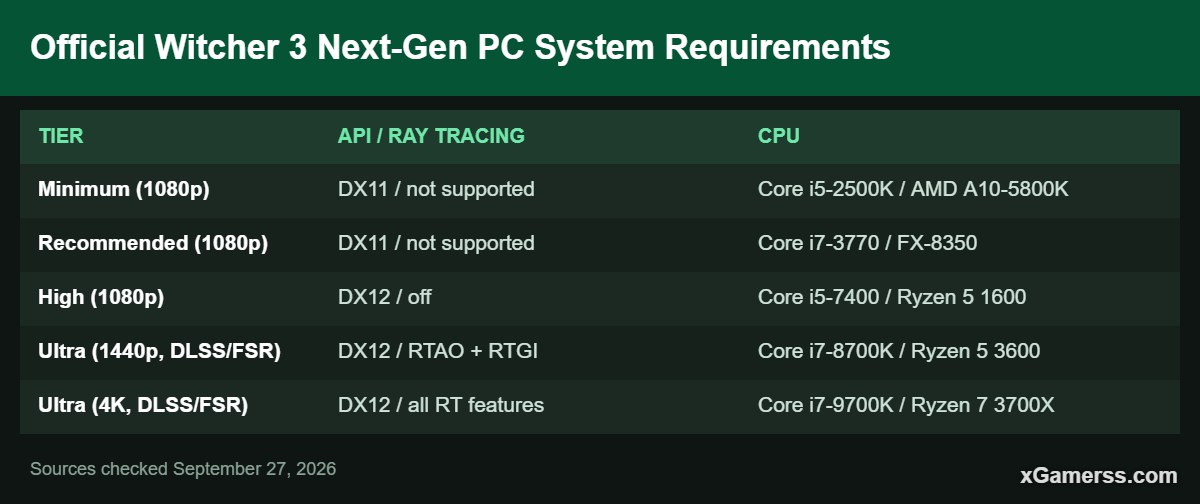
CD Projekt Red's support site lists five hardware tiers for the next-gen version. The two lowest tiers run in DirectX 11 with no ray tracing. The top three use DirectX 12, and the two Ultra tiers expect ray tracing combined with an upscaler.
| Tier | API / Ray tracing | CPU | GPU | RAM |
|---|---|---|---|---|
| Minimum (1080p) | DX11 / not supported | Core i5-2500K / AMD A10-5800K | GTX 660 / Radeon HD 7870 | 6 GB |
| Recommended (1080p) | DX11 / not supported | Core i7-3770 / FX-8350 | GTX 770 / Radeon R9 290 | 6 GB |
| High (1080p) | DX12 / off | Core i5-7400 / Ryzen 5 1600 | GTX 970 / RX 480 | 8 GB |
| Ultra (1440p, DLSS/FSR) | DX12 / RTAO + RTGI | Core i7-8700K / Ryzen 5 3600 | RTX 3070 / RX 6700 XT | 16 GB |
| Ultra (4K, DLSS/FSR) | DX12 / all RT features | Core i7-9700K / Ryzen 7 3700X | RTX 3080 / RX 6800 XT | 16 GB |
Every tier requires 50 GB of storage. CD Projekt Red notes that support for Windows 7 and 8 ended on May 21, 2024, so the DX12 tiers' 64-bit Windows 10/11 requirement is the realistic baseline for everyone now.
The Steam page is slightly different. Its "Recommended" block lists a Core i5-7400 or Ryzen 5 1600, 8 GB RAM, a GTX 1070 or Radeon RX 480, and DirectX 12. Where the two disagree, treat CD Projekt Red's support table as the fuller reference. The Steam listing is the one about to change. Our Witcher 3 game hub keeps the latest PC requirements in one place.
DX11 vs DX12: Which Mode Should You Use?
The next-gen update ships as two versions of the game. On Steam, the REDlauncher lets you choose DirectX 11 or DirectX 12 before you start the game. On GOG, the game launches in DX12 by default.
Choose DX12 if...
- You want any ray-traced effect. NVIDIA's launch notes say ray tracing and DLSS appear once you "load into the DirectX 12 version of the game."
- You want DLSS 3 Frame Generation (RTX 40 Series and newer).
- You have a reasonably modern CPU. CD Projekt Red's DX12 tiers start at a Core i5-7400 or Ryzen 5 1600, and ray tracing tiers start at a Core i7-8700K or Ryzen 5 3600.
Choose DX11 if...
- Your hardware sits near the official Minimum or Recommended tiers, which CD Projekt Red specifies for DX11 only.
- You don't plan to use ray tracing, and DX12 feels less smooth on your CPU. At launch, Digital Foundry described the DX12 version as "heavily single-threaded," with one or two threads loaded and the rest largely idle.
- You're on an AMD GPU and want the classic path. Patch 4.03 fixed a DX11 crash on launch or when loading a save on some AMD GPUs, so make sure you're fully updated.
DX11 is not an outdated fallback. It is the mode CD Projekt Red lists for lower-end systems, and it avoids the DX12 CPU overhead covered below. If you have an RTX card and want the next-gen lighting, though, DX12 is the only way to get it.
Ray Tracing, DLSS, FSR and XeSS: What the Current Version Supports
This is the current 4.x feature set according to CD Projekt Red's patch notes and NVIDIA's launch coverage.
- Ray-traced effects (4.0): global illumination (RTGI), ambient occlusion (RTAO), reflections and shadows. NVIDIA says its RT global illumination uses RTXGI, and ray-traced reflections improve water reflections in particular.
- RTGI performance mode (4.01): an optional mode that, according to CD Projekt Red, "improves frame rate by prioritizing performance over range and precision."
- DLSS (4.0): DLSS Super Resolution works on all GeForce RTX GPUs. DLSS 3 Frame Generation only works on RTX 40 Series cards (and newer). NVIDIA Reflex is included as well.
- AMD FSR 2.1 (4.0): the upscaler that works across vendors. CD Projekt Red's Ultra tiers pair ray tracing with "DLSS/FSR."
- Intel XeSS (4.03): added later, in patch 4.03.
- ULTRA+ preset (4.0): goes above the old Ultra for background character count, shadows, grass density, textures, foliage visibility range, terrain, water and detail level.
Frame generation in the current build is NVIDIA's DLSS 3 only. None of the official 4.x patch notes we checked list FSR frame generation. Radeon and Arc owners get upscaling but not frame generation in this version.
Known CPU-Bound Issues and the Fixes That Actually Help
The biggest complaint about the next-gen PC version has been CPU performance, not GPU load. Digital Foundry's launch analysis found that a Core i9-12900K with an RTX 4090 couldn't hold 60fps at ULTRA+ with ray tracing and dropped into the 40s at times. The cause was the heavily single-threaded DX12 version.
CD Projekt Red acknowledged the problem. In February 2023 it said it was "working to improve how the game handles CPU core utilisation." Patch 4.02 (March 13, 2023) then shipped with "improved CPU core utilization in the DX 12 version." So be careful with launch-era benchmarks. They show the worst case, and a fully patched game should behave better.
Fixes, in order of impact
- Update to the latest patch. The DX12 CPU improvements in 4.02 and the ray tracing optimizations in 4.03 only help if you're up to date.
- Use DLSS 3 Frame Generation on RTX 40 cards. Digital Foundry found that frame generation greatly reduces the CPU limit, with frame rates "more than doubling" in its tests. NVIDIA claims up to 2.3x more performance from DLSS 3. Frame generation adds some latency, so leave Reflex on.
- Switch RTGI to performance mode. This is the official lever for ray tracing cost, added in 4.01 for exactly this purpose.
- Try DX11 if you don't need ray tracing. If DX12 stutters or hits a CPU wall on your system, DX11 avoids the DX12 overhead Digital Foundry flagged.
- Reduce ULTRA+ crowd settings in dense cities. "Number of background characters" is one of the ULTRA+ options. More NPCs on screen usually means more CPU work, so if Novigrad or Beauclair frame rates are much lower than in open areas, lower this setting first. This is our practical suggestion, not a benchmarked figure.
Upscaling alone won't fix a CPU bottleneck. DLSS, FSR and XeSS reduce GPU load by rendering at a lower resolution, so they help when your graphics card is the limit. If your GPU is well below full usage and FPS is still low, the CPU is the problem, and the fixes above matter more than the upscaler preset.
Settings With the Biggest FPS Impact
We only list settings where a reputable source reports a measured or officially stated cost. We don't publish invented percentages.
- Ray-traced global illumination: the single most expensive switch. Digital Foundry measured about a 35% drop from RTGI alone on a Core i9-12900K with an RTX 4090 at launch.
- Ray-traced reflections: Digital Foundry measured about another 15% drop on top of RTGI.
- RTGI mode: CD Projekt Red says performance mode improves frame rate by trading away range and precision, so it's the obvious middle ground between RT off and full RTGI.
- Screen Space Reflections: patch 4.01 fixed SSR, which previously did nothing on PC even when switched on. CD Projekt Red warned that players with SSR on High "may notice a performance impact" after the fix. If you lost FPS after that patch, this is the reason.
- ULTRA+ preset: CD Projekt Red says it "significantly increases the visual fidelity" by raising grass density, foliage range, shadows and more. Treat it as a high-end preset, not a default.
RT shadows and RT ambient occlusion are part of the full RT package in CD Projekt Red's Ultra 4K tier. We didn't find a reliable per-setting cost for either in the current build, so test them on your own system.
Recommended Settings by GPU Tier
These starting points are based on CD Projekt Red's official hardware tiers. They are not our own benchmark results. Frame rates will vary with your CPU, resolution and where you are in the world, so start here and adjust using the high-impact settings above.
| GPU class (examples) | Mode | Preset / resolution | Ray tracing | Upscaler / frame gen |
|---|---|---|---|---|
| Legacy (GTX 660–770, R9 290) | DX11 | Low–Medium, 1080p | Not available | None |
| Low-end (GTX 970/1070, RX 480) | DX12 (DX11 if CPU-limited) | High, 1080p | Off | FSR 2.1 Quality if needed |
| Mid-range (RTX 3070, RX 6700 XT) | DX12 | Ultra, 1440p | RTAO + RTGI (performance mode), reflections off | DLSS or FSR 2.1 (XeSS on Arc) |
| High-end (RTX 3080, RX 6800 XT) | DX12 | Ultra, 4K | All RT features | DLSS or FSR 2.1 Performance/Balanced |
| RTX 40 Series and newer | DX12 | Ultra / ULTRA+, 1440p–4K | All RT features | DLSS + Frame Generation, Reflex on |
On mid-range cards, the goal is to keep the next-gen lighting while avoiding its full cost. RTGI in performance mode and no RT reflections gives you most of the visual upgrade. Reflections are the add-on Digital Foundry measured as costing about 15% on top of RTGI. The official 1440p Ultra tier also uses only RTAO and RTGI, not the full RT package.
On RTX 40 and 50 cards, frame generation makes ULTRA+ with full ray tracing realistic by working around the CPU limit.
Witcher 3 Remastered PC Specs: What Is Officially Known
Remastered launches September 29, 2026, as a free upgrade on GOG, Steam and the Epic Games Store, according to CD Projekt Red. The official announcement mentions upgraded visuals and performance but doesn't list specific PC graphics technologies. Here is what else is on record.
New requirements (preliminary)
New Remastered requirements have appeared on store listings. Games.gg describes the Battle.net listing as preliminary. These figures are higher than the current Steam specs:
- Minimum: 64-bit Windows 11, Core i5-8400 or Ryzen 5 2600, GTX 1660 6GB / RX 5500 XT 8GB / Arc A580, 12 GB RAM, 70 GB SSD.
- Recommended: 64-bit Windows 11, Core i7-8700K or Ryzen 5 3600X, RTX 2060 SUPER / RX 6600 XT / Arc B580, 16 GB RAM, 70 GB SSD.
The specs don't state a target resolution or frame rate. Since they're labeled preliminary, CD Projekt Red could still adjust them before launch.
Confirmed graphics features
NVIDIA's Game Ready driver 617.14 announcement confirms that Remastered adds path tracing, DLSS 4.5 Ray Reconstruction and upgraded DLSS 4.5 Super Resolution. It also adds Dynamic Multi Frame Generation with "up to 6X frame multiplication on GeForce RTX 50 Series GPUs" and path-traced hair rendering built on HairWorks. Outlets including TweakTown and VideoCardz also report support for AMD FSR 4 and Intel XeSS 2.0. The CD Projekt Red announcement we read doesn't list these, so treat them as reported rather than confirmed by the developer.
Still unknown
- Whether a separate DX11 mode will remain after the upgrade.
- The official ray tracing and path tracing tiers, and the GPUs they target.
- Whether FSR 4 or XeSS 2 will include frame generation in this game.
We'll rewrite the requirements, DX11/DX12 and preset sections after launch, based on the final Steam listing and patch notes. Some sites have posted "predicted" path tracing specs. These are not official, and we've left them out.
Frequently Asked Questions
QIs Witcher 3 better on DX11 or DX12?
DX12 is required for ray tracing, DLSS and DLSS 3 Frame Generation, so it's the better choice on modern RTX, Radeon RX 6000+ or Arc GPUs. DX11 is the official mode for lower-end hardware and avoids the DX12 CPU overhead, so it's usually the smoother choice on older systems.
QDoes The Witcher 3 next-gen support DLSS 3 frame generation?
Yes. The 4.0 update added DLSS 3, and NVIDIA limits Frame Generation to GeForce RTX 40 Series (and newer) cards in the DX12 version. Older RTX cards get DLSS Super Resolution without frame generation.
QDoes Witcher 3 support FSR and XeSS?
The current version supports AMD FSR 2.1 (added in 4.0) and Intel XeSS (added in patch 4.03). Remastered is reported to move to FSR 4 and XeSS 2.0.
QWhy is Witcher 3 next-gen stuttering or CPU-bound on my PC?
At launch, the DX12 version relied heavily on one or two CPU threads. Patch 4.02 improved core utilization, so first make sure you're fully updated. Beyond that, DLSS 3 Frame Generation (RTX 40+), RTGI performance mode, fewer background characters or switching to DX11 are the most effective fixes.
QWill the system requirements change with Witcher 3 Remastered?
Yes. Steam says the requirements "will change on 2026.09.29." Preliminary listings point to 64-bit Windows 11, a GTX 1660 / RX 5500 XT / Arc A580 minimum, 12 GB RAM and a 70 GB SSD.
If you'd rather spend your time playing than tuning, our Witcher 3 beginner's guide and combat tips for beginners are good next reads. PC players who want to test settings in specific locations can also use Witcher 3 console commands to get there quickly.
Sources checked on September 27, 2026 against the Steam store listing, CD Projekt Red's technical support requirements page and patch notes 4.0–4.03, CD Projekt Red's Remastered announcement, NVIDIA GeForce News and Digital Foundry's next-gen PC analysis.
Kai Mercer covers game news, free games, release calendars and guides for xGamerss.
More from Kai Mercer →
Comments (0)
No comments yet. Be the first!
Sign in or create an account to earn karma — or comment as a guest.