
How to Install Witcher 3 Mods (Next-Gen): Manual, Vortex & Script Merger Guide
How to install Witcher 3 mods on next-gen PC: Mods and DLC folders, Vortex, Script Merger, mods.settings load order, fixes, and prep for the Remastered update.

In this article (0 sections)
Updated September 27, 2026. To install Witcher 3 mods on the current next-gen (Complete Edition) PC version, you extract each mod into the Mods folder inside your game directory, put any DLC-style parts into the game's DLC folder, and copy menu XML files into bin\config\r4game\user_config_matrix\pc. You can do it by hand or with Vortex, and Script Merger fixes most conflicts between script mods. Below: each step, load order, uninstalling, common errors, and what the September 29 Remastered update means for mods.
Quick answer
Put mod folders whose names start with mod into
Before You Start: Check Your Game Version and Back Up
The 2022 next-gen update, which the Complete Edition runs on, broke many older mods, especially script and character mods. Nexus Mods added Next-Gen Update Compatible and Next-Gen Update Incompatible tags, and CD PROJEKT RED published a compatibility document.
Before you install anything:
- Verify your game files in Steam or GOG Galaxy so you start from a clean install.
- Back up your saves. They are in Documents\The Witcher 3\gamesaves. Copy that folder somewhere cloud sync can't overwrite it.
- Back up your settings files in Documents\The Witcher 3 (user.settings, dx12user.settings, input.settings), because many mods ask you to edit them.
- Make sure every mod supports the next-gen version. Check the mod page, tags and recent comments.
If you really need an old mod that only works on the pre-next-gen game, CD PROJEKT RED's support site explains how to switch back. On Steam, open Properties, go to Betas and choose "CLASSIC". On GOG Galaxy, go to Manage Installation, then Configure, and set the Beta Channel to "Classic". On Epic Games Store you can't roll back. CDPR also notes that only the latest version is fully supported.
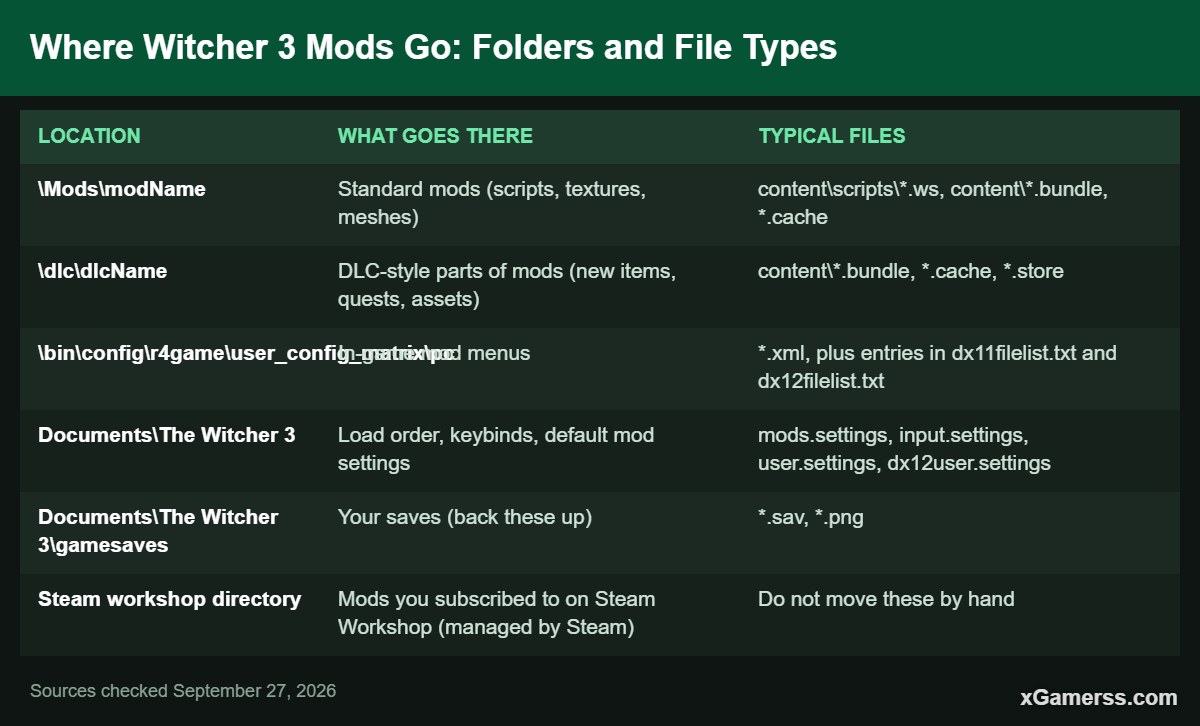
Where Witcher 3 Mods Go: Folders and File Types
A next-gen mod setup uses only a few locations. The Mods folder isn't there on a fresh install, so create it yourself in the game's root folder, next to bin, content and dlc. According to CDPR's official REDkit documentation, the game only loads subfolders whose names start with "mod" (for example mod0000_MergedFiles) and ignores everything else.
| Location | What goes there | Typical files |
|---|---|---|
| Standard mods (scripts, textures, meshes) | content\scripts\*.ws, content\*.bundle, *.cache | |
| DLC-style parts of mods (new items, quests, assets) | content\*.bundle, *.cache, *.store | |
| In-game mod menus | *.xml, plus entries in dx11filelist.txt and dx12filelist.txt | |
| Documents\The Witcher 3 | Load order, keybinds, default mod settings | mods.settings, input.settings, user.settings, dx12user.settings |
| Documents\The Witcher 3\gamesaves | Your saves (back these up) | *.sav, *.png |
| Steam workshop directory | Mods you subscribed to on Steam Workshop (managed by Steam) | Do not move these by hand |
The next-gen menu change: dx11filelist and dx12filelist
Since the next-gen patch, every menu XML also has to be listed in dx11filelist.txt and dx12filelist.txt in that same folder. The entry is the file name followed by a semicolon, for example modPreparationsConfig.xml;. The community tool Menu Filelist Updater does this for you. Put it in the game folder or the pc folder, run it, and it adds your installed menus to both filelists. If a mod's options page is missing from the Options menu, this is usually why.
Mods with both a Mods and a dlc part
Some bigger mods ship with two folders, for example a modSomething folder and a dlcSomething folder. You need both. The mod folder goes into Mods and the dlc folder goes into the game's dlc folder. Don't delete or rename the official DLC folders already in there.
How to Install Witcher 3 Mods Manually
Installing by hand takes longer, but you always know where every file went. Here is the usual process:
- Download the next-gen version of the mod from its page. Many mods offer separate "Next-Gen" and "Classic" files.
- Read the install instructions on the mod page. Every mod is packaged a little differently, and CDPR's REDkit wiki also says to follow each mod's own instructions.
- Extract the archive and copy the
modNamefolder into\Mods Mods\modName\content\...and notMods\modName\modName\content\.... A doubled folder is one of the most common mistakes. - Copy any dlc folder into
\dlc - Copy menu XML files into
bin\config\r4game\user_config_matrix\pcand add them to both filelists, either by hand or with Menu Filelist Updater. - Add keybinds or default settings if the mod asks for them. These go into input.settings, user.settings and dx12user.settings in Documents\The Witcher 3. The Preparations mod, for example, warns that most of its options stay off if you skip this step.
- Run Script Merger if you have more than one script mod (see below).
- Launch the game. Scripts compile at startup. If you get an error screen, go to the troubleshooting section.
Many next-gen mods need framework mods such as Community Patch - Base or Community Patch - Shared Imports, so install any listed requirements first.
How to Install Witcher 3 Mods With Vortex
Vortex is the official mod manager from Nexus Mods, and it supports The Witcher 3. The Vortex wiki's Witcher 3 guide recommends this setup:
- Install Vortex and The Witcher 3 in their default locations, then log in to your Nexus Mods account in Vortex.
- Go to Games, find The Witcher 3 and click Manage.
- On Nexus Mods, use "Mod Manager Download", or drag a downloaded archive onto Vortex's drop zone.
- Install and enable the mod, then click Deploy Mods.
- Set priority on the Load Order tab by dragging mods up or down.
If your game and Documents folders are on different drives, Vortex may have to switch from hardlink to symlink deployment, and deployment can fail if your account can't create symbolic links. For mods you already installed by hand, the cleanest fix is to zip them, delete the loose copies and reinstall them through Vortex. Choose one method and use it for everything, because mixing the two is how people end up with duplicate folders.
Script Merger: What It Does and When You Need It
Many Witcher 3 mods change the same script files (.ws). The game compiles all scripts when it starts, and if two mods override the same file, only one version wins or you get a script compilation error. CDPR's REDkit documentation puts it this way: "This error is caused because multiple mods edit the same files."
Script Merger is a free community tool on Nexus Mods, tagged as next-gen update compatible. It finds conflicts and creates merged files in a new folder called mod0000_MergedFiles, which loads first. It doesn't change your original mod files. How to use it:
- Open Script Merger and point it at your Witcher 3 install folder.
- Click Refresh to scan for conflicts.
- Tick the conflicting files and click Create Selected Merge.
- Most conflicts merge automatically. If one doesn't, the built-in KDiff3 window opens and you choose which lines to keep.
When you need it: whenever two or more mods include .ws scripts, and again after every install, update or uninstall of a script mod. Texture-only mods usually don't need a merge. Bundle merging needs extra tools (QuickBMS and wcc_lite). For conflicts it can't merge, you set the load order instead.
A June 2024 game patch also added script overrides for modders (such as @wrapMethod). CDPR says that with mods built this way, "users only need to worry about priority." Many mods don't use overrides yet, so you still need Script Merger.
Load Order Basics: mods.settings
By default the game loads the folders in Mods in alphabetical order. That's why mod authors often add prefixes like mod0000_ or modAAA to their folder names. To set the order yourself, create a text file called mods.settings in Documents\The Witcher 3 and add one section per mod folder:
[mod0000_MergedFiles]

Enabled=1

Priority=1
- Enabled: 1 means active and 0 means inactive. According to CDPR's docs, mods are enabled by default.
- Priority: a number from 1 to 9999. According to the Vortex Witcher 3 guide, the mod with the lower number wins when two mods conflict.
- The section name has to exactly match the folder name under Mods.
Keep mod0000_MergedFiles at the top. Vortex users should set the order on the Load Order tab instead of editing the file by hand.
REDkit and Steam Workshop Mods
The Witcher 3 REDkit is CD PROJEKT RED's official modding tool, made with Yigsoft. It launched for free on May 21, 2024 on Steam, GOG and Epic Games Store for owners of the PC base game. Its Steam page says it can create "new quests, items, weapons, and characters," as well as animations, storylines and new territories. The Steam version includes Steam Workshop integration.
You don't need REDkit to play mods, only to make them. What matters to players is how Workshop mods behave. CDPR's REDkit wiki says Workshop mods are installed by subscribing, live in Steam's workshop directory instead of
Witcher 3 Remastered (September 29) and Your Mods
The Witcher 3 Remastered comes out as a free upgrade on September 29, 2026. For a full list of what it changes, see our Witcher 3 Remastered release date and free upgrade guide. Here is what the sources we checked confirm about mods:
- Cross-platform mod support is official. CD PROJEKT RED announced support for mods on PC, PS5 and Xbox Series X|S through mod.io, which requires a mod.io account linked to a CD PROJEKT RED account. It was delayed from 2025 into 2026. CDPR has said that "it may not be possible to bring every mod uploaded on PC to console," and REDkit is recommended for cross-platform mods but not required. Several outlets report that this support launches with the Remastered update.
- HD Reworked Project is being built in. Its creator, HalkHogan, says he is working with CDPR and that his work will be officially in the game on September 29, so a separate HDRP install "will no longer be needed."
- PC mod compatibility is not confirmed. We found no official CDPR statement on whether existing Nexus Mods mods will keep working after the update.
What to do: back up your gamesaves, your Documents\The Witcher 3 settings files, and your Mods, dlc and pc menu folders before the update. Afterwards, test a clean start with mods disabled, then turn mods back on in small groups as authors confirm compatibility. CDPR hasn't said whether the pre-Remastered build will stay available as its own branch the way "Classic" did.
How to Uninstall Witcher 3 Mods
- Vortex: disable or remove the mod, then click Deploy. Vortex removes the files it deployed.
- Manual: delete the mod's folder from
Modsand any matching folder fromdlc(never the official ones). - Delete its menu XML from the pc folder and remove its line from dx11filelist.txt and dx12filelist.txt, or run Menu Filelist Updater again.
- Delete the mod's section from mods.settings entirely. The Vortex guide specifically says to delete the bracketed entry, not just disable it.
- Open Script Merger and delete or rebuild any merge that included the removed mod. Otherwise the merged files keep the removed mod's changes.
- Remove any keybinds you added to input.settings if they cause problems.
Mods that add items or change progression can leave data in your save, so load a backup if a save misbehaves.
Common Errors and Fixes
Script compilation error at launch
Two or more mods change the same script, or a mod was made for a different game version. Run Script Merger. If the error remains, the error screen names the file that failed. Find which mod owns that file and check that it's the next-gen version. If it's still unclear, disable your newest mods one at a time.
Mod menu doesn't appear in Options
The XML is either in the wrong folder or missing from dx11filelist.txt and dx12filelist.txt. Run Menu Filelist Updater. Also check whether you're running DX11 or DX12, since each one reads its own filelist.
Mod options are all off or missing values
You skipped the step where you paste the mod's default settings into user.settings and dx12user.settings. Do that for both files.
Mod seems to do nothing
Check that the folder name starts with "mod", that there's no doubled folder, and that another mod with a lower priority number isn't overriding it in mods.settings.
Crashes or infinite loading
An old or incompatible mod is the usual cause. Verify your game files and add mods back in small batches. Don't install old copies of mods the next-gen update already includes, such as HD Reworked Project and World Map Fixes.
To test things quickly without installing more mods, our Witcher 3 console commands guide shows how to spawn items and change the game state. New to the game? Start with the Witcher 3 beginner's guide, or browse the Witcher 3 hub.
Frequently Asked Questions
QWhere is the Witcher 3 Mods folder?
It's in the game's root install folder, next to bin, content and dlc. If it isn't there, create a folder named Mods yourself. Each mod goes into its own subfolder, and the subfolder name must start with "mod".
QDo old Witcher 3 mods work with the next-gen version?
Many don't. Install only files marked next-gen compatible, or switch to the "Classic" branch on Steam or GOG for old mods.
QDo I need Script Merger if I use Vortex?
Yes, if you use more than one script mod. Vortex manages files and load order but doesn't merge scripts. It keeps Script Merger's output in the first slot.
QDoes a lower Priority number in mods.settings win?
Yes. According to the Vortex Witcher 3 guide, the mod with the lower priority number overrides mods with higher numbers when they conflict. Mods not listed in mods.settings load alphabetically.
QWill my mods break with Witcher 3 Remastered?
CDPR hasn't confirmed either way for existing PC mods. Back up your saves, settings and mod folders before September 29, then re-enable mods in small groups after the update and check each mod page for updates.
QDo I need REDkit to use mods?
No. REDkit is CDPR's free tool for creating mods. Players only need the mods themselves, from Nexus Mods (manual install or Vortex) or from Steam Workshop.
Sources checked on September 27, 2026 against CD PROJEKT RED's REDkit documentation and press center, CD PROJEKT RED support, the Witcher 3 REDkit Steam page, the Vortex Witcher 3 modding guide, and the Script Merger and Menu Filelist Updater pages on Nexus Mods.
Kai Mercer covers game news, free games, release calendars and guides for xGamerss.
More from Kai Mercer →
Comments (0)
No comments yet. Be the first!
Sign in or create an account to earn karma — or comment as a guest.